
How Not to Redesign Your Website
June 8, 2026 · 9 min read
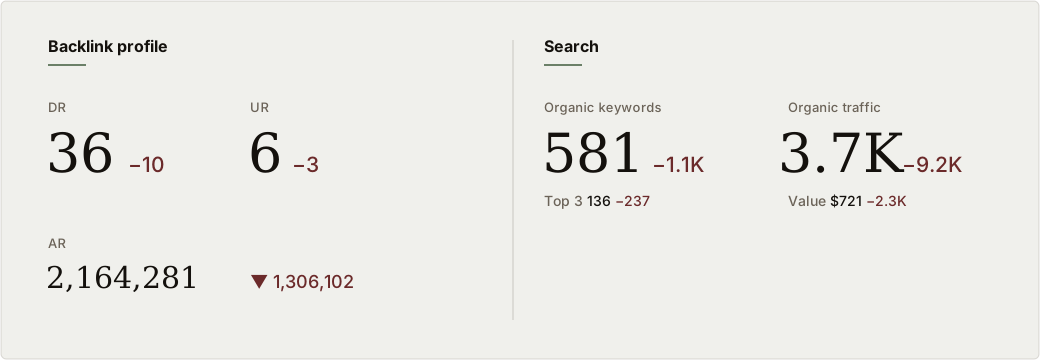
The real backlink and search profile of the site described below, anonymized. Every figure in red is a loss, measured against where the site stood before the redesign.
A website redesign is supposed to be a step forward. New look, faster pages, a sharper story. Done right, it carries everything you have earned (rankings, links, the structured data that makes search engines understand your business) into a cleaner house. Done wrong, it sets fire to years of work in a single weekend, and nobody notices until the traffic graph falls off a cliff.
We were recently brought in to recover one of these. The business is not ours to name, and the team that ran the migration does not need to be identified. But the pattern is common enough, and expensive enough, that the lessons are worth writing down. Consider this the anti-playbook: a tour of exactly how to erase your organic visibility during a redesign, followed by the checklist that would have prevented all of it.
Start with the numbers, because they make the damage undeniable. The snapshot above is the site's own backlink and search profile, pulled after the redesign. Every figure in red is a loss, measured against where the site stood before. Organic traffic fell by roughly 9,200 visits a month, down to 3,700, more than two-thirds of the site's search traffic, gone. The number of keywords the site ranked for dropped by about 1,100. Top-three rankings, the positions that actually earn clicks, fell by 237. Domain Rating, a measure of the site's link authority, dropped ten points. The estimated value of the traffic the site lost was around 2,300 dollars a month. This was not a slow seasonal dip. It happened in the window around a single redesign, and it happened because the migration broke three things at once.
How does that happen? Three failures, stacked.
Failure one: the redirects were written but never actually fired. Every URL on your old site is an asset. Search engines have indexed it, other sites link to it, people have bookmarked it. When you change your URL structure during a redesign (and almost every redesign changes the URL structure), each of those old addresses needs a 301 redirect pointing to its new equivalent. The 301 tells Google "this moved permanently, send the ranking and the link equity to the new address." Skip it and every old URL becomes a dead end. Visitors hit a 404. Google drops the page from the index. The links pointing at it stop counting.
Here is the part that makes this one especially instructive. The redirects were not entirely missing. A handful had been configured. But the new platform was running in a mode where that particular configuration file was silently ignored at the hosting layer, so the redirects that did exist never ran at all. The team had written the rules, checked the box, and moved on, never confirming that a single redirect actually fired in production. The lesson is brutal and simple: configuration is not behavior. A redirect you have written but not tested is a redirect that may not exist. We ended up rebuilding the redirect map almost from scratch, going from a token handful to roughly fifty rules covering old URLs, normalized product slugs, legacy paths, and the inevitable WordPress detritus, and then verifying each important one with an actual request to confirm it returned the right status and destination.
Failure two: content was deleted, not migrated. A redesign is a tempting moment to "clean up." Old posts feel dated, thin pages feel embarrassing, and it is easy to decide that a leaner site is a better one. Sometimes that is true. But content that ranks is content that earns traffic, and traffic is the entire point.
In this case, a flagship article that had been live since 2013 and had quietly collected backlinks for over a decade was simply gone after the migration. No redirect, no archived copy in the new system, no inventory noting that it mattered. The only reason it was recoverable at all is that we pulled the original text out of an old Wayback Machine snapshot, rebuilt it, refreshed it for the current year, and republished it at a clean URL with a proper redirect from the old address. That is a lucky outcome. Plenty of deleted pages are not archived anywhere useful, and when they are gone, the rankings and the links that pointed at them go with them.
This is the part owners underestimate. A page that looks unremarkable in the CMS can be the exact page that answers the question your best prospects type into Google, and the page that a dozen other sites chose to link to. Delete it without checking and you do not just lose the page. You hand the ranking to a competitor, who is happy to take it.
Failure three: the custom schema was flattened to plugin defaults. This one is invisible until you go looking, which is why it does so much quiet damage. Structured data (schema markup) is the code that tells search engines what your content actually is: this is a service, this is a location, this is an article, this is the organization behind it, and here is how those things connect. Good custom schema is a real competitive edge. It is what earns the rich results and, increasingly, it is what helps AI search engines understand and cite you correctly.
The old site had structured data that had been built up deliberately over time, describing the business and its services in its own specific language. The migration wiped that and let the generic plugin defaults stand in its place. Overnight, carefully tuned markup became the same boilerplate every other default install publishes. Worse, the cleanup surfaced markup that was now actively broken: a page describing a service was tagged as downloadable software, which is a schema type Google requires extra fields for, so it threw structured-data errors instead of earning anything. And because both the www and the non-www versions of the site were being indexed as separate properties, those errors were duplicated across two copies of every page. The site had stopped describing itself in its own voice and started speaking in factory settings, badly.
The result: visibility collapsed, and recovery is slow. Put those three failures together and the outcome is the snapshot we opened with. Organic visibility fell hard within weeks. And here is the cruel part: a redesign-driven collapse is far slower to recover than it was to cause. You can break it in a weekend. Earning back lost rankings, getting deleted pages reindexed, rebuilding link equity that now points at dead URLs, and waiting for search engines to recrawl and re-trust the site takes weeks at the fastest and one to two months before meaningful traffic returns, and some of it never fully comes back. The competitors who absorbed your rankings while you were down do not politely hand them back.
None of this is exotic. It is not a freak technical accident or a platform bug. Every one of these failures comes from treating a redesign as a visual project when it is really a migration project that happens to include a new design. The look is the part everyone can see, so it gets the attention. The plumbing is the part that holds your traffic, and it gets ignored until it is too late.
Here is the pre-launch checklist that prevents all of it. Before a single new page goes live, run this:
- Crawl the old site and inventory every URL. Export the full list. This is your source of truth for what exists today and what must be accounted for after launch.
- Pull your top organic pages and your most-linked pages before you touch anything. Rank them by traffic and by inbound links. These are protected assets. Nothing on this list gets deleted without a deliberate, documented decision.
- Build the redirect map URL by URL. Every old address gets a 301 to its closest new equivalent. Not the homepage. The equivalent. If there is no equivalent, redirect to the nearest relevant page, not a dead end.
- Confirm the redirects actually fire in the real environment. Configuration is not behavior. Different hosting setups handle redirect rules differently, and some silently ignore the file you put them in. Test real requests against real URLs and check the status code and destination. A redirect you have not verified does not count.
- Audit and preserve your structured data. Document the custom schema on the old site, then confirm it is rebuilt on the new one. Do not assume the SEO plugin will recreate it. It will give you defaults, and sometimes broken ones. Validate every schema type against the rich-results testing tool before launch.
- Pick one canonical domain and stick to it. Make sure www and non-www (and http and https) all resolve to a single version. Indexing two copies of the same site doubles your errors and splits your signals.
- Stage everything and test before cutover. Build on a staging environment, not the live site. Crawl staging for broken links, missing redirects, and 404s. Fix it there, where customers cannot see it.
- Cut over, then immediately re-verify. The moment the new site is live, re-crawl it. Submit the updated sitemap to Google Search Console and request indexing on your priority URLs. Spot-check your most important old URLs and confirm each one 301s where it should.
- Watch the data for ninety days. Migration damage shows up in rankings and indexation, not just sessions. Monitor Search Console for crawl errors, dropped pages, and lost queries so you can catch a problem in week one instead of month three.
A redesign run this way is boring, and boring is the goal. The traffic carries forward, the rankings hold, the rich results survive, and the new site is simply a better version of a business that never lost a step. The work that protects all of that is exactly the work this site was built on: defining what matters, mapping it deliberately, and measuring the result. If you want to see how we approach the search and structured-data side of it, that is the heart of our SEO and GEO content engine, and if you are staring down a redesign and want a second set of eyes before you launch, we are happy to look.
A redesign should move you forward. The only way it moves you backward is if the migration is treated as an afterthought. Inventory everything, redirect everything and confirm it fires, protect your content and your schema, pick one canonical domain, and test before you launch. The new paint is the easy part. The plumbing is what keeps the traffic flowing.